After a bit of a hiatus, meet Edit Flow v0.5. The editorial calendar has been on the feature request from the beginning. With this release Edit Flow takes another step toward full news-cycle management. I’m personally quite enthusiastic about this release, as it play a crucial role in my news organizations decision to use WordPress / Edit Flow as the print CMS for the daily newspaper that I manage. This release lays a foundation for several exciting enhancements to come.
Features introduced in this release:
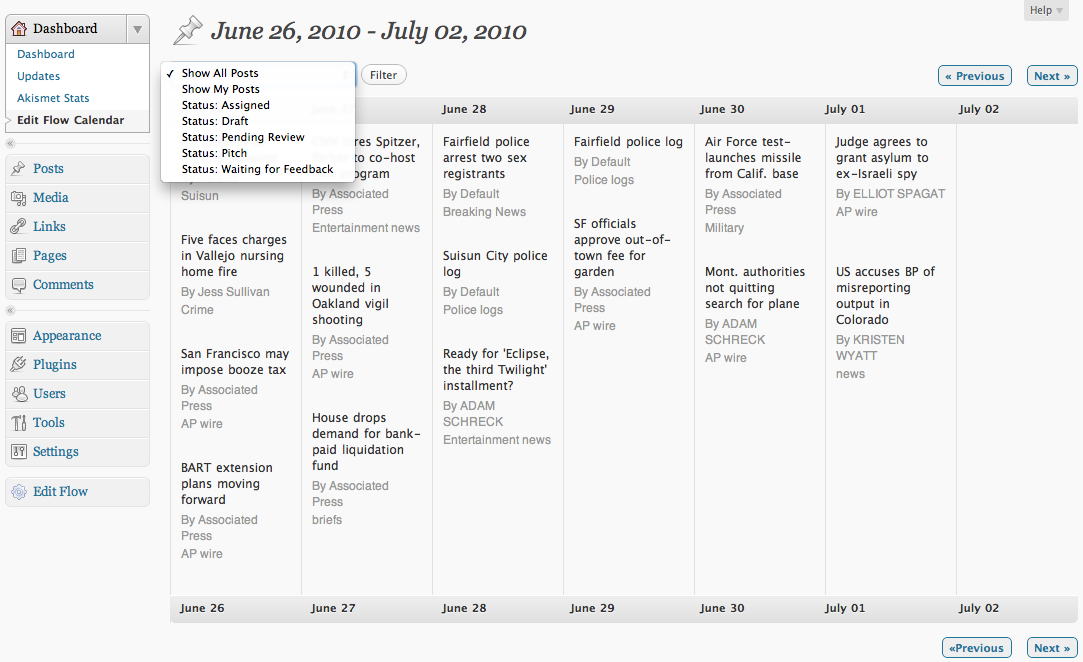
EditFlow Calendar
- Drag & Drop posts
- 7 day calendar view

Filter by Custom Status
- Writers: Show only posts assigned to me
- Editors: Show only Draft status (great for managing deadlines)
If you haven’t upgraded yet, download it from the Plugin Directory or directly from within WordPress.

This is fantastic. Would it would as well for a single blogger as it does for an entire newsroom? If so, I’m in!
Michelle Rafter
WordCount: Freelancing in the digital age
It should… Try it out and let us know what you think!
Hi, I have used this plugin for a long time and I have to say it’s the best plugin to do editorial. However, I recently updated EditFlow and I got this error:
Fatal error: Call to undefined function register_post_status() in ...wp-content/plugins/edit-flow/php/custom_status.php on line 59I lost all assigned posts.
Do you have any information about this error?
Thanks!
Do you think it’s caused by WP 3.0? I’m using 2.9…
Got it, upgraded to WP 3.0 will resolve this issue! Great plugin btw!
Is there a way to disable the calendar? I don’t want my guest blog contributors to see the posts I’m working on and this allows them to.
Unfortunately you can’t at this point; that was an oversight on our part. I’ll make sure it gets added to an upcoming release!
Something that wasn’t clear in the description of the Edit Flow plugin is whether it enhances (fixes) the (rather broken) “Preview” function of WordPress. Right now, whenever I want someone to preview a draft without giving them a login for WordPress, I have to send them a screenshot. If I send the preview link, it just gives a “you do not have permission” message when they click on it.
Does Edit Flow make it possible to send around a draft for review to people who have and don’t have a WordPress login, instead of having to do screenshots or resorting to publishing it fully?
It’s not possible currently but that’s a great idea!
I will definitely donate to the cause if you make it have that capability. It’s been the biggest thorn in my side since I started promoting WordPress as our company’s editorial workflow system.
@Rob: It seems someone else already beat us to the punch, and it looks like a pretty solid plugin at that. Definitely check it out and report back:
http://wordpress.org/extend/plugins/public-post-preview/
Also looks like another developer simplified that plugin and released as a new plugin with public previews off by default:
http://wordpress.org/extend/plugins/simple-preview/faq/
@Kendall: What exactly is it that contributors can see that you don’t want them to? The titles of your draft posts or the posts themselves? The titles can already be seen at edit.php, and contributors can’t view or edit posts admins are writing from the calendar.
That said, look forward to an on/off switch with the very-soon upcoming minor release of EF 🙂
The contributors can see the titles of my drafts posts and I’d like to prevent this. (I’d prefer to not let them see what I have coming up!)
I use the Role Scoper plug-in to prevent them from seeing the titles in edit.php and would like to be able to prevent them from seeing the titles in Edit Flow as well! I hope that makes sense…
Thanks for taking this into consideration into your new release!!
Ah, understood. I added a new capability, ef_view_calendar, to the plugin over the weekend, as well as the ability to turn off the calendar completely. While I defaulted to give contributors that capability, you can easily remove it with Role Scoper. Hope that helps! We should have these changes released in v0.5.1 in a few days.
You’ve got to be fucking kidding me. The Mountain Democrat is switching to WordPress? I grew up near Placerville and almost got a job there when I was like 18. That is unreal.
Hey guys,
I tried submitting feedback by email but they got bounced. Might want to check on that.
The bug I noticed was that author (reporter) could change deadlines in the calendar by dragging posts from one date to another… especially already published posts. That’s something major.
Great plugin though!
Sorry for the late reply. User permissions with the calendar is a known issue that we fixed in 0.5.1, the version we tagged on Wednesday night. Furthermore, it gives you the ability to disable the calendar if you so desire. Try it out and let us know what you think!
Great plugin.
How about adding the ability to show more than one week at a time with the calendar. similiar to http://wordpress.org/extend/plugins/editorial-calendar/screenshots/
I’ve been a fan of Edit Flow from the beginning and I really like the concept of the Edit Flow Calendar! Is it possible to include pages in the view?
Probably something completely stupid on my side, but the pludin cannot be started. My wp (3.1 alpha) tells me:
Fatal error: Class ‘WP_User_Search’ not found in /home/burgundy-report/public_html/wp/wp-content/plugins/edit-flow/php/util.php on line 40
See something obvious from your side?
Thanks
Thanks for bringing this up! Looks like some changes were made to core for 3.1, which dropped the WP_User_Search class and the reason why it’s throwing the error. We’ll have to make some changes on our end to support this.
For now, I’d say stick to 3.0.x
It appears if you just change the word “Search” to the word “Query” in that one line of code, your plugin is compatible with WordPress 3.1.
Please check this and update it. Thanks!
Robby, can you create a new thread in the WordPress.org forums for this? I’m not quite sure what you’re referring to.
Never mind; I accidentally had an older version of Edit-Flow installed and it looked like I had a workaround.
The current version does seem to work well with WordPress 3.1
Feel free to delete this comment thread.
To give my editors access to change the post status, I have to give them the capability to “Publish.” This isn’t something I can do as a post could be accidentally published early.
I can’t seem to find if your code has the option to display the drop down ‘status’ box, or if it’s WP’s default code.
Do you know how I can control which roles can see the ‘status’ drop down box? Also, is there a way to limit what what custom_statuses are available to each role? I’m using a capabilities manager, but I’m not sure where, in your code, these would be.
Thanks for a great plugin!
Thanks for your comment David; glad you like the plugin!
This is a limitation on the WordPress side; like you point out, only users with the publish_post capability can see the custom status dropdown. We’ve had this request from a number of people and there is a workaround for this, but it’s not the most elegant thing in the world. I’ll write up a blog post on how to do this in the next few days.
On the upside, there are some changes planned in the next version of WordPress that should hopefully make it easy to have better control over who can access what statuses and so on.
I was wondering if there was a follow-up blog post tto David’s question regarding enabling the custom status dropdown without the publish_post capability? Thanks!
Not yet… Could you explain better what you need in the support forums?
I’m happy to add to the praise for your plugin.
One feature request: is it possible to add times to the calendar? It’s annoying that WordPress shows posts as “scheduled”, but not the time. You’ve improved that by showing date, but we often have posts scheduled to go up at, say 7am, 10am and 11am. Would be good to be able to see that without going into the individual post.
Thanks again.
Thanks for your comment Lance! And a good point on adding times to the calendar. We’ll see if we can work it in for an upcoming release.
Awesome job on this.
The ‘editorial calendar’ plugin was locking up my admin panel. This is a major improvement in concept and execution.
CP
Thanks! Let us know if there are any features Editorial Calendar had that you think are missing from Edit Flow. We’re always happy to entertain feature requests 🙂